






![Pulsar TenZ 2.0 Signature Edition [Pro Series]](http://waimers.in/cdn/shop/files/TenZ2.0_Top_v.png?v=1790280058&width=800)
![Pulsar [Pro Series] Susanto-X 2.0 Gaming Mouse](http://waimers.in/cdn/shop/files/Susanto-X_20_Panthom-Jungle_top_large_da1dc919-3823-4032-9a05-6c6ba2b3975e.webp?v=1788783197&width=800)







![Pulsar [Pro Series] Jinggg-X Medium Gaming Mouse](http://waimers.in/cdn/shop/files/Pulsar-jingggX_top_large_3b9147c5-4003-4c18-bc3d-8131064c2b18.webp?v=1783883297&width=800)




![Oni's Oath Glass Pad [鬼の誓い] - Limited Edition](http://waimers.in/cdn/shop/files/image_bb601c8e-0651-4702-b96f-abd41acfdbd3.png?v=1756477743&width=800)
![Jinsoku Edgeless Speed Mousepad - [迅速]](http://waimers.in/cdn/shop/files/JinsokuEdgeless-L-MidnightPurple.jpg?v=1768143245&width=800)
![Wraith Ace Series [Ravenfall] Limited Edition Poron Mousepad](http://waimers.in/cdn/shop/files/48x48_siralama_99aaa6eb-5f9d-406f-a019-92dbcd7025b4.webp?v=1787263809&width=800)




Mouse Notes 07
Connection + Power
Parts covered: wireless radio + antenna, receiver / dongle, battery, charging circuit, USB-C + cable.
1. How a mouse connects
Every mouse connects one of four ways.
| Wired | cable, no battery |
| 2.4GHz | dongle, for gaming |
| Bluetooth | no dongle, office |
| Tri-mode | all 3 in one |
- Wired: always connected, no power saving -> full speed. Cheaper (no battery, no wireless chip), never needs charging.
- 2.4GHz wireless: uses a dongle + a custom fast radio link. This is the GAMING mode.
- Bluetooth: no dongle, great for laptops + office - still too slow for competitive gaming.
- Tri-mode: wired + 2.4GHz + Bluetooth (or NearLink) in one mouse.
~ like: 2.4GHz = a private phone line to your PC. Bluetooth = a shared public line.
2. Same idea, different brand names
Every brand gives its 2.4GHz tech a fancy name. They all do the same job: a fast private link through a dongle.
| LIGHTSPEED | - | Logitech |
| HyperSpeed | - | Razer |
| Quantum 2.0 | - | SteelSeries |
| SLIPSTREAM | - | Corsair |
| SnappyFire | - | Ninjutso x PixArt |
| Smart Speed X | - | budget (Beken CompX) |
~ like: Maggi, Yippee, Top Ramen - different names, all instant noodles.
e.g. Razer also sells a 'HyperPolling' dongle for 8000Hz. Ninjutso Sora V3 includes its SnappyFire x PixArt 8K receiver in the box.
3. NEW: NearLink (SparkLink)
- What: a newer Chinese short-range wireless standard, showing up on some mice (e.g. tri-mode NearLink / 2.4G / Bluetooth models).
- History: the alliance behind it started on 22 September 2020 as the 'SparkLight Alliance', later renamed the NearLink Alliance. Early nickname: 'Greentooth'.
- Claims: low-energy mode for mice + headsets, on 2.4GHz, up to 12 Mbit/s (6x Bluetooth), 250 microsecond latency.
!! These are STANDARD claims, not test results. Test a NearLink mouse like any other before you trust the number.
~ like: a new highway built by a different company - promised faster, but check the real traffic yourself.
4. Wireless vs wired latency (honest truth)
- Top wireless mice (e.g. Logitech Superlight) test around 1-2 ms click latency - same class as wired.
- Wired still wins on: price, no battery, plug-and-play, zero charging.
~ like: old phone calls had a delay; today's video calls feel instant.
5. The dongle (receiver)
- 1K dongle: normal receiver, up to 1000Hz.
- 4K / 8K dongle: special high-speed receiver. Sometimes in the box, sometimes sold separately.
e.g. WLMouse Beast X / Strider: 8000Hz wireless only with the included 8K adapter.
e.g. Some budget brands: 4000Hz only with an OPTIONAL 4K receiver - check the box before you buy!
Why dongle placement matters:
e.g. 8BitDo Retro R8's charging dock doubles as a signal extension. Logitech gives an adapter to put the receiver near the pad.
6. Interference (crowded 2.4GHz)
- Wi-Fi router, Bluetooth, microwave, baby monitor, USB 3.0 port - your mouse signal has to get through all of this.
- Many devices share 2.4GHz. Modern gaming mice use frequency hopping = jump to a clearer channel automatically.
- USB 3.0 tip: USB 3.0 ports can create radio noise near 2.4GHz. Try the dongle in a USB 2.0 port or on an extender close to the mouse.
~ like: talking in a crowded wedding hall - move closer or find a quieter corner.
7. Battery
- mAh: milli-Amp-hours = how much energy the battery stores. Bigger = more hours, more grams.
- Li-ion / Li-Po: lithium-ion / lithium-polymer. Li-Po can be made in flat, custom shapes - handy inside thin, light mice.
e.g. WLMouse Beast X / Strider: 300mAh. Endgame Gear XM2we: 410mAh (~1 week). OP1we: 335mAh (~1 week).
e.g. Some brands say many sub-60g mice cut batteries to ~250-300mAh to save weight.
Battery life depends on polling rate:
e.g. Logitech Superlight 2 DEX: up to 95 hours. Razer Basilisk V3 Pro: up to 90 hours. Budget 250mAh tri-mode: ~40h at 1000Hz.
e.g. Logitech G305: 250 hours on a replaceable battery.
- 'Up to X hours': ask at WHICH polling rate - brands usually quote the best case.
- Battery care: don't leave it at 0% for months; batteries slowly lose capacity with age + heat.
~ like: a phone battery - 2 years later it doesn't last like day 1.
8. Charging
- USB-C cable: most common. Check: can you play while charging? (port position + cable drag)
- Charging dock: place the mouse on a stand - some docks also act as a dongle extender.
- Charging circuit: small chips inside that charge the battery safely.
e.g. Razer Mouse Dock Pro + Wireless Charging Puck - both sold separately.
Logitech POWERPLAY 2 (charge while playing):
- No receiver inside: POWERPLAY 2 only supplies power - use your mouse's own dongle.
e.g. Works with Superlight 2, Superlight 2 DEX, Superlight, PRO 2 LIGHTSPEED, PRO Wireless, G703, G903, G502 X PLUS / LIGHTSPEED, G309 + more.
~ like: wireless charging for phones - but it keeps working while you're using it.
9. Cables (wired mice + charging cables)
Different cable types feel very different - a stiff cable pulls on your mouse like a leash.
- Rubber: basic stock cable. Stiff, drags on the desk - the old reason people hated wired mice.
- Braided / fabric: woven cover, tough - but some are thick + stiff.
- Paracord: PARAchute CORD style - braided nylon sheath, super light, flexible, low drag. Feels almost wireless.
e.g. some thicker Razer Basilisk-style braided cords.
e.g. Razer SpeedFlex, Glorious Ascended Cord, HyperX HyperFlex, Endgame Gear Flex Cord 5.0 / 6.0.
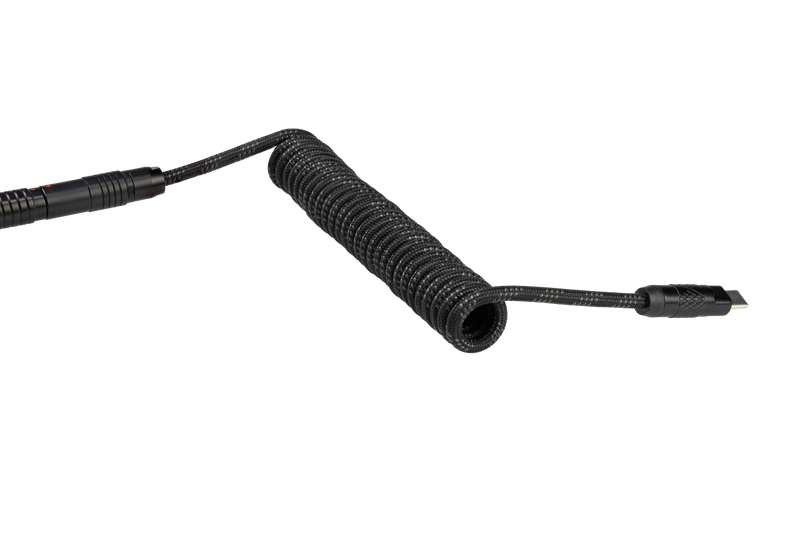
- Coiled: curly cable for looks, often with a detachable connector.
- Charging cables: many wireless mice charge with a STIFFER USB-C cable than premium wired paracord - so 'play while charging' can feel heavy.
- Strain relief: the part where the cable enters the mouse. An ANGLED one lifts the cable off the pad.
e.g. Attack Shark R2 Pro comes with a coiled cable. Glorious sells an Ascend paracord charging cable so you can play while charging. Endgame Gear OP1 has an angled stress relief.
~ like: walking a dog - a stiff leash pulls you back, a light loose leash you barely feel.
Mouse bungee (cable holder):
e.g. Razer Mouse Bungee V3 (spring arm, fits rubber / braided / paracord), Endgame Gear MB1, Pulsar Micro Bungee ES, Glorious bungee.
~ like: a clothesline holding the cable up so it never touches the floor.
10. Sleep mode (wireless power saving)
- Sleep / idle mode: wireless mice go to sleep after some time without movement to save battery.
- Wake-up: some mice need a click or a move to wake - a tiny delay can annoy you mid-game after a pause.
- Wired = no sleep: wired mice don't need power saving, so they're always fully awake.
e.g. Endgame Gear says its wired OP1 8k doesn't need power saving because the cable keeps it connected.
~ like: a phone screen turning off when you stop touching it.
-> before you buy, check if the sleep timer can be changed in the software.
11. Connection + Power Dictionary
- 2.4GHz: 2.4 gigahertz - the radio band gaming mice, Wi-Fi + Bluetooth all use.
- RF: Radio Frequency - wireless signals.
- Dongle / receiver: small USB piece that catches the mouse's signal.
- Polling rate: how many times per second the mouse reports (1000Hz = every 1ms).
- Latency: delay from your action to the result on screen.
- Frequency hopping: jumping between channels to avoid busy ones.
- Bluetooth: named after an old Danish king, Harald 'Bluetooth' - he united tribes, Bluetooth unites devices.
- BLE: Bluetooth Low Energy - the power-saving version.
- NearLink / SparkLink: newer Chinese wireless standard (early nickname 'Greentooth').
- Tri-mode: 3 connection modes in one mouse.
- mAh: milli-Amp-hour - battery capacity.
- Li-ion / Li-Po: lithium-ion / lithium-polymer batteries.
- USB 2.0 / 3.0: USB versions - 3.0 is faster but can add 2.4GHz noise near the dongle.
- USB-C: the reversible oval USB plug.
- POWERPLAY: Logitech's charge-while-you-play mousepad system.
- Paracord: short for PARAchute CORD - light braided nylon rope style, used for flexible mouse cables.
- Bungee: named after the stretchy bungee cord - holds your mouse cable up.
- Strain / stress relief: the flexible part where the cable meets the mouse, stops it breaking.
- Detachable cable: cable you can unplug + replace (USB-C on many mice).
12. What to test before you buy
- Battery life at 1K, 4K + 8K - note start %, end %, hours.
- Does 4K/8K need a special dongle? Is it included or an extra cost?
- Dongle in USB 3.0 vs USB 2.0 / extender - any stutter?
- Distance test: dongle at back of the PC vs next to the pad.
- Bluetooth / NearLink: fine for office use? Note it's not for competitive play unless you test it yourself.
- Charging: can you play while charging? Is there a dock? Any wireless charging support?
- Charge time from 0-100% + any fast-charge claim.
- Cable: rubber / braided / paracord? Stiff or floppy? Angled strain relief?
- Sleep timer: how long before sleep, can you change it, any wake-up delay?