




![Pulsar TenZ 2.0 Signature Edition [Pro Series]](http://waimers.in/cdn/shop/files/TenZ2.0_Top_v.png?v=1790280058&width=800)
![Pulsar [Pro Series] Susanto-X 2.0 Gaming Mouse](http://waimers.in/cdn/shop/files/Susanto-X_20_Panthom-Jungle_top_large_da1dc919-3823-4032-9a05-6c6ba2b3975e.webp?v=1788783197&width=800)






![Pulsar [Pro Series] Jinggg-X Medium Gaming Mouse](http://waimers.in/cdn/shop/files/Pulsar-jingggX_top_large_3b9147c5-4003-4c18-bc3d-8131064c2b18.webp?v=1783883297&width=800)
![Oni's Oath Glass Pad [鬼の誓い] - Limited Edition](http://waimers.in/cdn/shop/files/image_bb601c8e-0651-4702-b96f-abd41acfdbd3.png?v=1756477743&width=800)
![Jinsoku Edgeless Speed Mousepad - [迅速]](http://waimers.in/cdn/shop/files/JinsokuEdgeless-L-MidnightPurple.jpg?v=1768143245&width=800)
![Wraith Ace Series [Ravenfall] Limited Edition Poron Mousepad](http://waimers.in/cdn/shop/files/48x48_siralama_99aaa6eb-5f9d-406f-a019-92dbcd7025b4.webp?v=1787263809&width=800)




Mouse Notes 08
Scroll Wheel + Small Parts
Parts covered: scroll encoder, scroll wheel, middle click, side buttons, flex cables, onboard memory, USB-C, DPI button, LEDs, frame + screws.
1. The scroll wheel system
- Encoder: counts each 'step' (notch) of the wheel and tells the mouse's chip which way you scrolled.
- Middle click: a small switch under the wheel - press the wheel down to click.
~ like: the ticks of an old radio dial - each tick = one step.
2. Encoder types
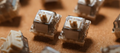
- Mechanical: metal contacts. Cheap + replaceable, but this is the part that wears out + gets dusty.
- Optical: light counts the steps, nothing touches, so it's immune to contact wear. Found in many newer esports mice.
- Magnetic (Logitech MagSpeed): in the MX Master line - below a speed it clicks step by step; spin harder and a magnet releases it into free-spin (up to 1000 lines/sec claimed). No grinding part to wear out.
~ like: mechanical = a door latch that wears; optical = an automatic sensor door; magnetic = a fridge door held by a magnet.
!! Conflicting info: one source says the Logitech Superlight uses a TTC mechanical encoder, another says the Superlight 2 uses optical - could be different models, so ask the seller which encoder your exact model uses before you buy.
3. Encoder brands + feel
Kailh Red - lightest TTC Red - light TTC Gold - medium ALPS - heavy
(TTC Red's placement is rough - listed as low scrolling force)
- TTC, Alps, Kailh: build most mechanical encoders.
- Kailh Red: lightest + smoothest, rated 50 million.
- TTC Red: low scrolling force, rated 5 million.
- TTC Gold: medium - the in-between pick, rated 50 million.
- ALPS (Japan): heavier, well-defined steps. Reported as the loudest, but most stable + long-lived.
e.g. Razer Viper V2 Pro: 12mm Kailh encoder. Logitech G Pro X Superlight: 8mm TTC encoder.
e.g. Endgame Gear XM2 8k: TTC Silver encoder. XM2 8k v2: upgraded dustproof Kailh. WLMouse Strider: 'Dust Proof Silver' encoder.
- Encoder height: replacements must match the height (commonly 9-14mm) - measured from the base plate to the wheel holder.
~ like: tyre sizes - the right brand but wrong size won't fit your bike.
4. Scroll problems + fixes
- Symptoms: scroll skips, double-scrolls, or jumps the WRONG direction.
- Main causes: dust in the slot + a worn mechanical encoder (the most common reason wheels start jumping).
Fix it step by step:
- Test - run an online scroll test.
- Clean - use compressed air while scrolling.
- Retest - still jumping?
- Replace - fit a new encoder.
- Replacing an encoder = desolder a few pins + solder a matching TTC / Alps / Kailh one. One of the easier mouse repairs.
- Why it matters: in CS2 / Valorant, a weapon switch on the wheel + one phantom reverse step can mean your knife comes out mid-clutch.
~ like: a ceiling fan collecting dust until it starts wobbling.
5. Scroll features
-
Free-spin: wheel spins freely for long pages.
e.g. Logitech G502 X: hyper-fast free spin + ratchet mode.
-
Tilt: push the wheel left / right for 2 extra buttons.
e.g. Logitech G502 X tilt, Razer Basilisk HyperScroll Tilt Wheel.
-
Defined steps: clear notches you can count - best for weapon switching.
e.g. Ninjutso HyperScroll: marketed for defined steps that stay consistent. Logitech Superstrike: tighter wheel than before (fewer accidental weapon switches).
6. Side buttons + extra buttons
- Normal gaming mice: 2 side buttons (forward + back).
- MMO mice: lots of side buttons for skills + macros (Razer Naga / Logitech G600 style) - heavier + bigger.
- Accidental presses: ultralight + fingertip-grip mice can have side buttons you hit by mistake.
-
Side button switches: often on their own small PCB, linked with a flex cable.
e.g. WLMouse Beast X: OM Blue Dots switches for side buttons.
~ like: the volume buttons on a phone - great when placed right, annoying when you press them by mistake.
7. Software + onboard memory
| G HUB | → | Logitech |
| Synapse | → | Razer |
| iCUE | → | Corsair |
| SteelSeries GG | → | SteelSeries |
| CORE | → | Glorious |
- Brand apps: install on your PC to change DPI, polling, buttons, lighting.
-
Web driver trend: configure in the browser - no install needed.
e.g. Zowie EC1-DW web driver, ASUS ROG Gear Link, Keychron Launcher web app.
- Onboard memory: saves DPI + settings inside the mouse, so you can take it to a friend's PC / a LAN and the settings stay.
~ like: contacts saved on your SIM card vs only inside one phone app.
8. The other small parts
- Flex cables: thin ribbon wires linking side / top boards to the main PCB. Like nerves.
-
DPI button: top or bottom. Bottom = no accidental presses mid-game.
e.g. Endgame Gear OP1 8k: CPI button on the bottom.
- USB-C port: for charging / wired use. Check whether you can play while it's charging.
-
LEDs / RGB: status light or decoration - adds weight + battery use.
e.g. Logitech G502 LIGHTSYNC RGB. Many ultralight mice skip RGB.
Frame + screws (the skeleton):
e.g. G-Wolves Warg / VUK Medium: carbon rod reinforcement. Ninjutso Sora V3: endoskeleton at 40g.
~ like: a tent - thin fabric (shell) + strong poles inside (frame).
9. Scroll + Small Parts Dictionary
- Encoder: from 'encode' - turns movement into a signal the mouse's chip understands.
- Detent / notch: each little 'click' step you feel while scrolling.
- Steps per rotation: how many notches in one full wheel turn.
- Free-spin: wheel spins without notches.
- MagSpeed: Logitech's magnetic scroll wheel (MAGnet + SPEED).
- Ratchet: the part that makes notches - like a bike's freewheel click.
- Tilt wheel: wheel you can push sideways for extra buttons.
- Encoder height: size of the encoder (9-14mm) - must match to replace.
- Dustproof encoder: sealed design that keeps dirt out longer.
- MMO mouse: Massively Multiplayer Online games mouse - lots of side buttons.
- Web driver: mouse settings page that runs in a browser.
- Onboard memory: storage inside the mouse for your settings.
- Flex cable: flexible ribbon wire between boards.
- Endoskeleton: 'endo' = inside - a frame inside the shell (like our bones).
10. Test before you buy
- Online scroll test: any skips or reverse steps?
- Step feel: light / medium / heavy, clear notches?
- Scroll noise: quiet or loud?
- Wheel wobble side-to-side?
- Middle click: too hard? does it scroll by accident while clicking?
- Side buttons: reach, feel, accidental presses?
- Software: app or web driver? does it save to onboard memory?
- DPI button position + frame flex (squeeze test)?
- Check again in the first 2-4 weeks (dust / wear)?